AI grading
Overview
AI grading uses large language models to grade manual questions in PrairieLearn. It applies your rubric to submissions, produces scores, and generates explanations instructors can review, adjust, or override.
Use cases
AI grading works on manually graded questions that use these elements:
Common use cases include:
- Essay and free-response questions
- Mathematical proofs and derivations
- Diagrams and handwritten work
- Code explanations and written reasoning
- Short-answer justifications
Prerequisites
Before you can use AI grading, you'll need:
- A course instance
- A manually graded question with at least one submission
- See the manual grading page for more details
- A rubric
- See the manual grading page for information on how to create one
- Read the best practices to optimize it for AI grading
- Course owner permissions, required to purchase credits
- AI grading billing configured for your course instance
Setup
-
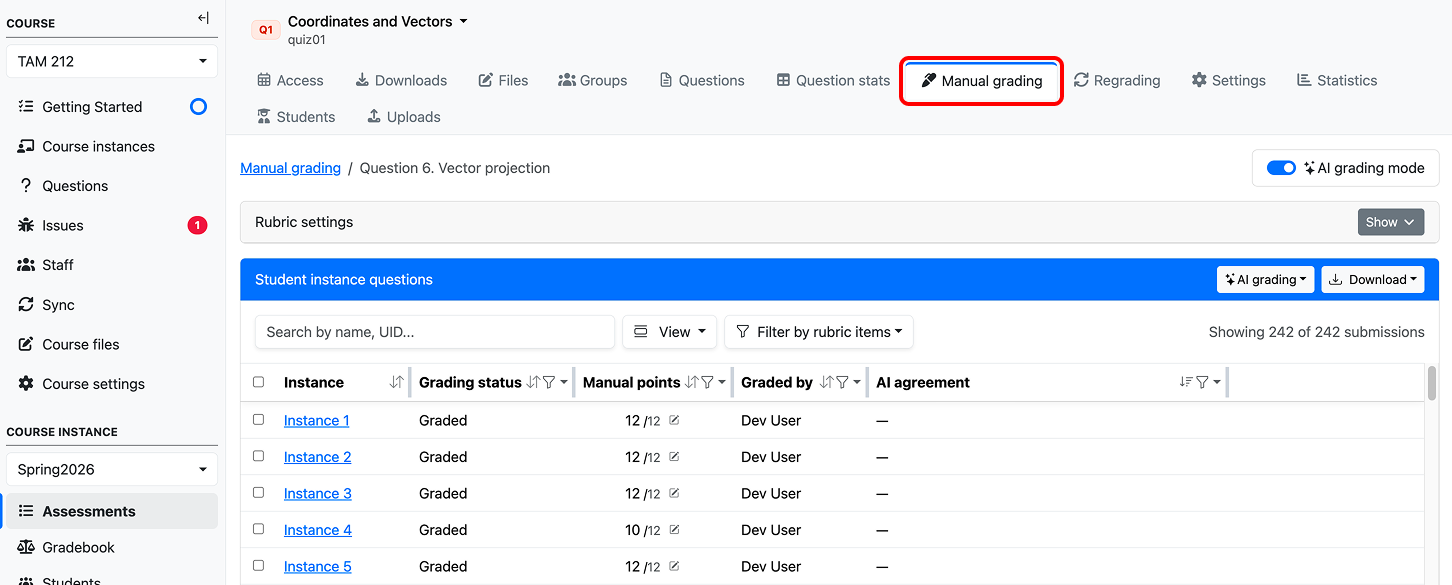
Navigate to manual grading for your assessment question.
-
Turn "AI grading mode" on.
-
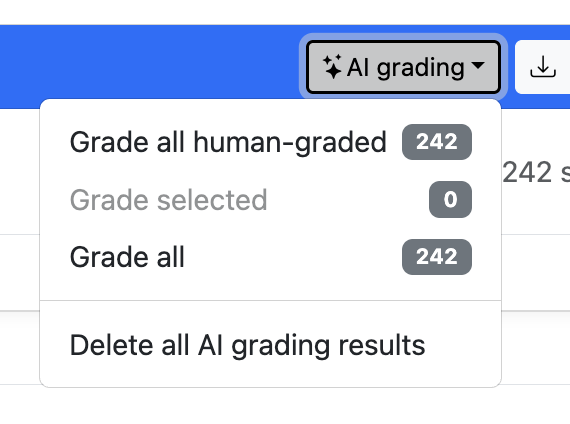
Open the "AI grading" dropdown. Select an option.
-
Select a model. Use PrairieLearn's recommended model for your question type.
-
Grade submissions. Test on a small batch (5 submissions), review the output, and refine your rubric before running on the full set.
Best practices
- Use PrairieLearn's recommended model. Model choice can significantly impact grading accuracy, particularly for image submissions. The recommended model is updated as provider capabilities change.
- Use rubrics over point-based grading. Rubrics give the model clear, discrete criteria, which significantly improves accuracy and consistency.
- Write well-specified rubric items. Each item should describe exactly what earns or loses credit. Ambiguous items produce ambiguous grades.
- Use grader guidelines. This field is for instructions the model should follow but that shouldn't appear in the student-facing rubric — e.g., "accept equivalent algebraic forms" or "do not penalize minor notation differences."
- Test with a small batch first. Running on 5–10 submissions surfaces rubric problems early, before you spend credits and time on the full set.
- Iterate. If you see systematic errors in the first batch, refine the rubric rather than overriding grades one by one.
Reviewing AI grading
Instructors should review AI output before relying on it for grades. For each submission, AI grading produces a graded rubric and explanation.
-
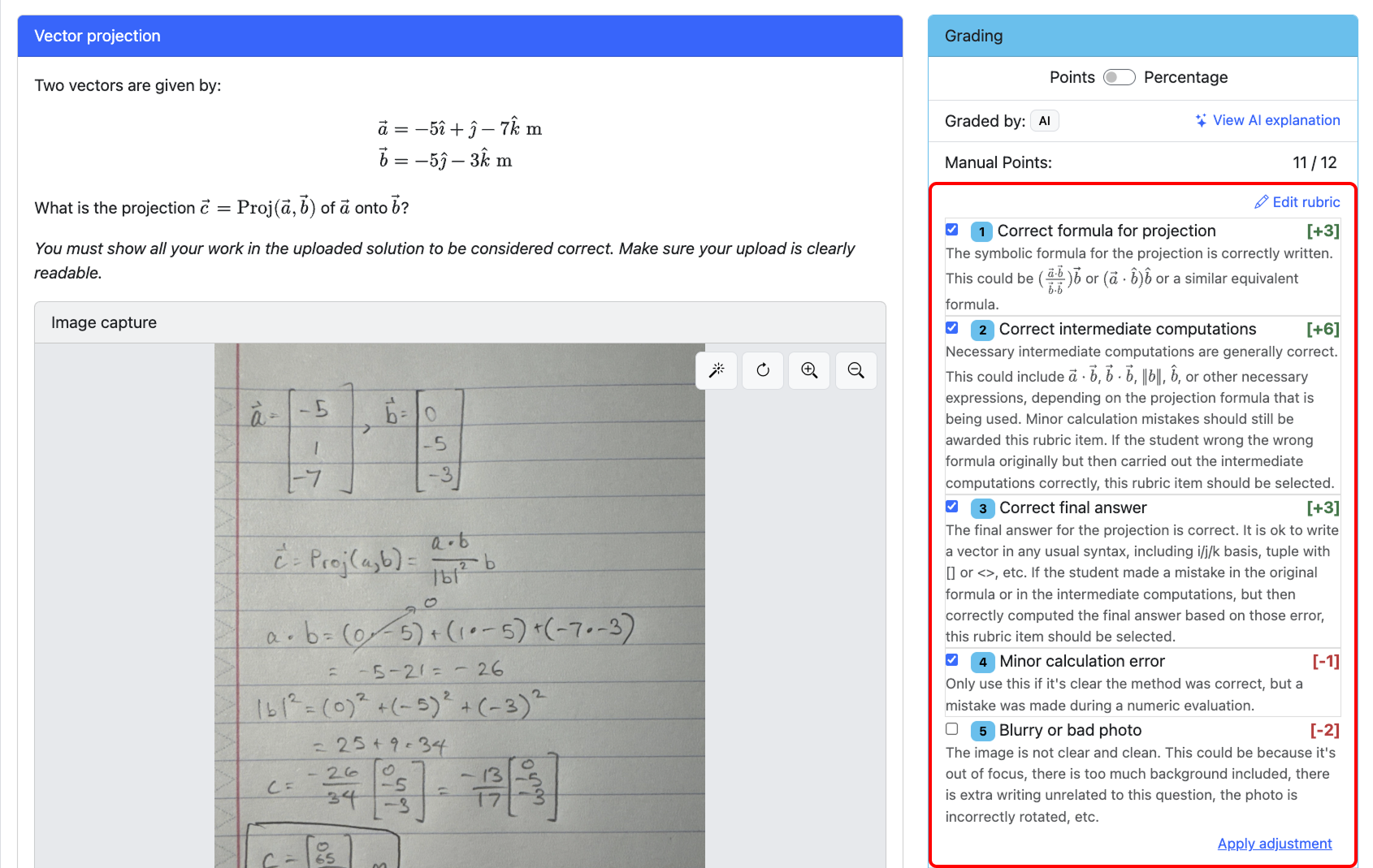
Graded rubric — The rubric items the model selected, along with their point values.
Manually changing the rubric items overrides the AI grading. Both the AI and human grading are visible.
Graded rubric example
The AI's selected rubric items appear in the grading panel on the right side of the instance question page.
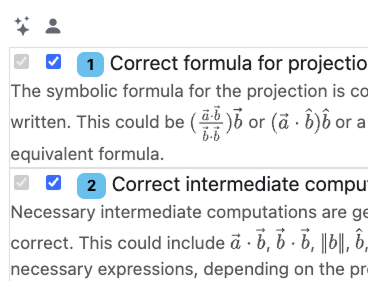
Once a human also grades the submission, both sets of selections appear side by side: the sparkle column shows the AI's selections, and the person column shows the human grader's.
-
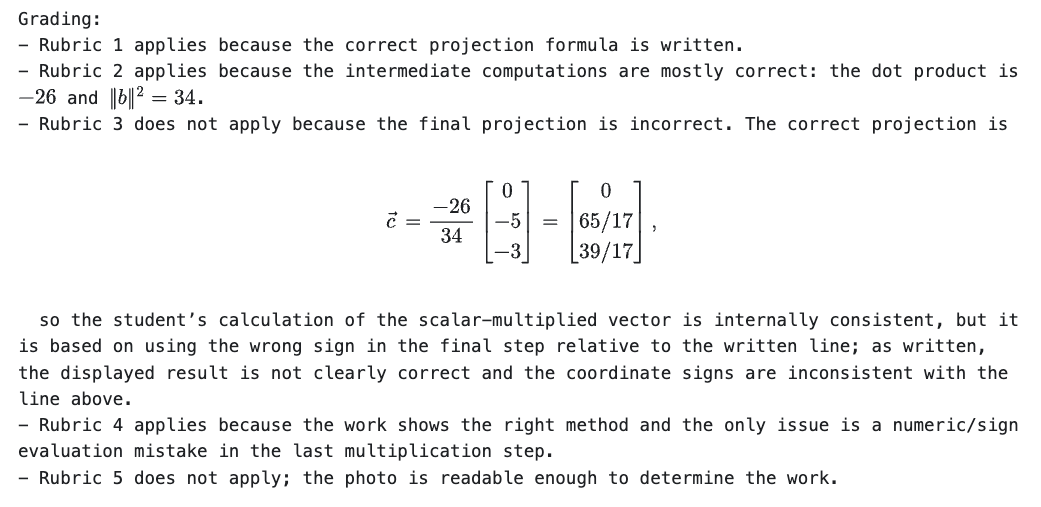
Explanation — The reasoning behind the model's grading decisions.
When the submission contains an image, the model's transcription of the image content is included.
Explanation example
Explanation:
Transcription (image submissions only):
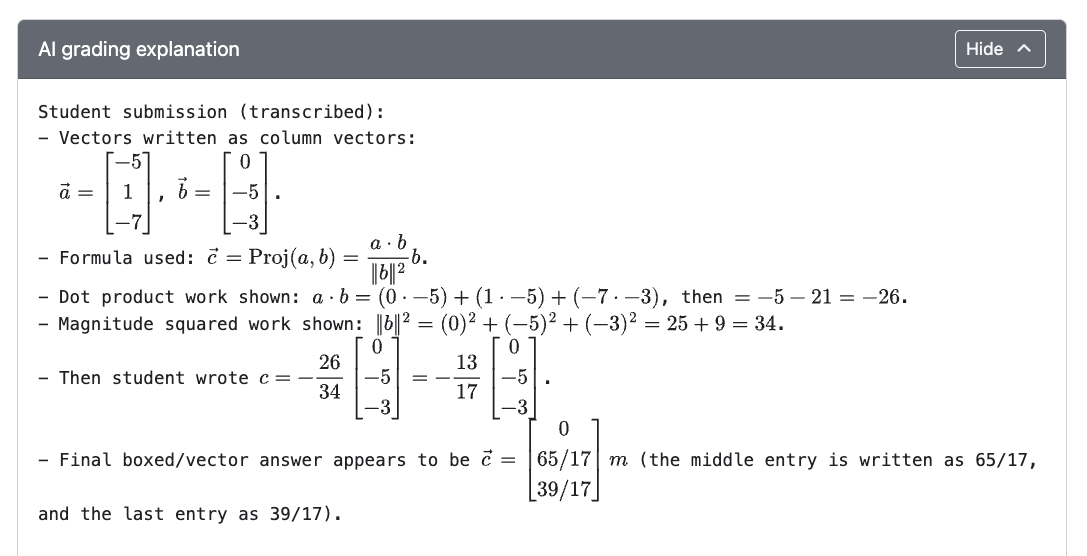
After both AI and human grades are present, PrairieLearn can also show comparison information:
-
AI agreement indicator — A per-item view of where the AI and human grader agreed or disagreed.
Once both an AI and a human have graded a submission, an "AI agreement" column appears in the manual grading table and rubric editor, flagging the rubric items they agreed or disagreed on.
Agreement indicator example

- Red plus — AI selected the item; the human did not.
- Red minus — The human selected the item; the AI did not.

The grading process
AI grading assembles a prompt from the following inputs and sends it to the selected model.
Inputs sent to the model:
- Tuned grader prompt (maintained by PrairieLearn)
- Question prompt
- Correct answer
- Rubric
- Student submission
Outputs returned:
- Graded rubric (item-by-item scoring)
- Explanation
- Transcription (image submissions only)
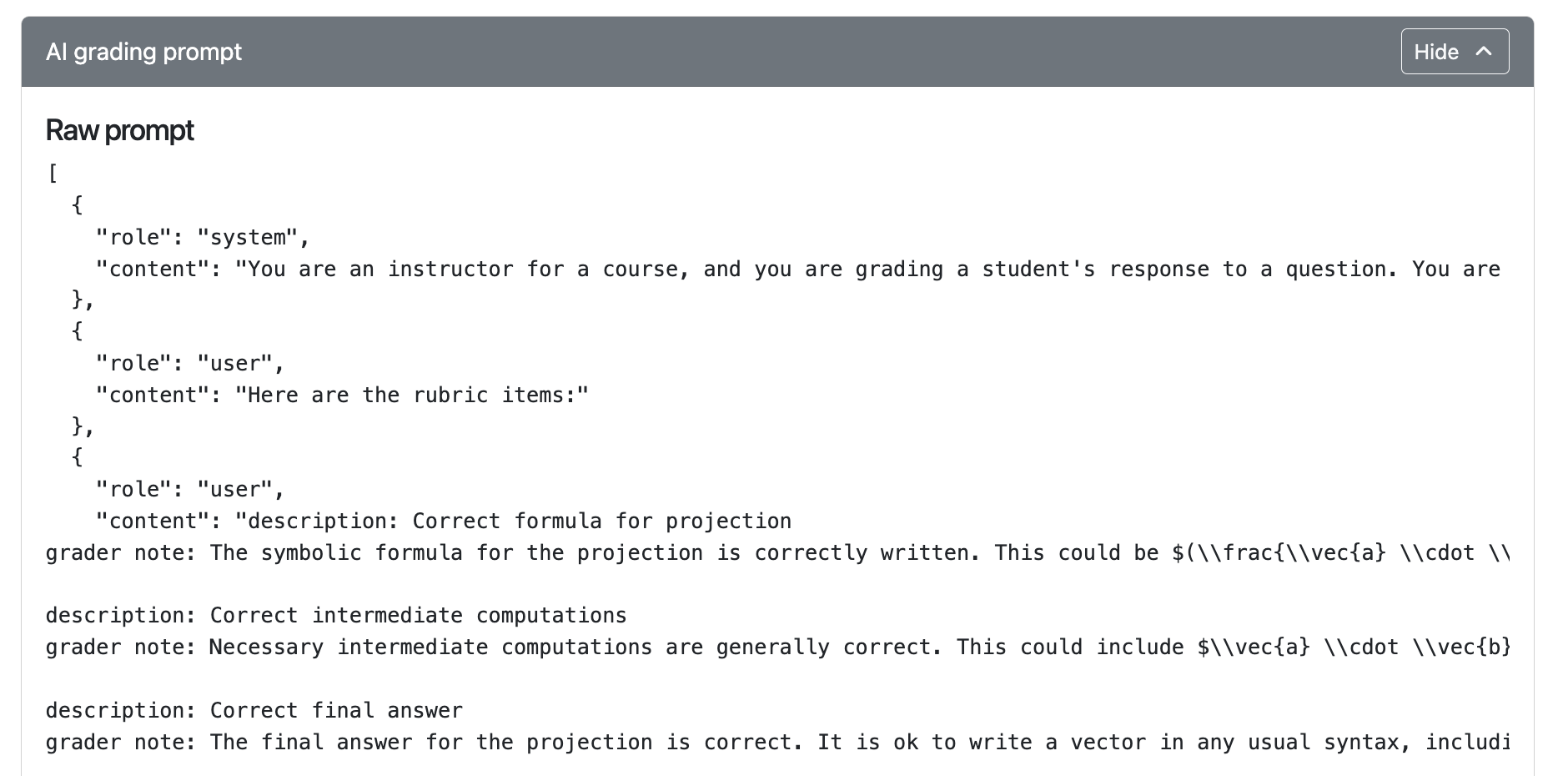
For transparency and debugging, the exact prompt sent to the model is available on each graded submission.
Example prompt
Rotation correction: Specifically for image grading with Gemini models, a separate LLM call first rotates the image so the handwriting is upright before grading runs.
Concurrency: AI grading keeps up to 20 submissions in progress at any time. When one finishes, the next begins automatically.
Privacy: Student identifying information (name, email, UIN) is not sent to LLM providers, as long as it is not in the submission, question, or correct answer. Avoid including unnecessary personal data in questions, rubrics, grader guidelines, or submissions. Student submissions are not used for model training when using PrairieLearn AI grading credits.
Billing
AI grading requires either PrairieLearn-managed credits or a custom API key. Billing is configured per course instance.
Billing modes
- PrairieLearn-managed credits — Simpler setup, no provider account needed. You purchase credits through PrairieLearn and pay a 20% infrastructure fee on top of provider costs.
- Custom API key — Bring your own provider key (OpenAI, Anthropic, Google). You're billed directly by the provider and PrairieLearn charges no infrastructure fee.
You can switch between billing modes at any time. Purchased credits and saved API keys persist until you explicitly remove them, so switching back later does not require re-purchasing credits or re-entering keys.
API keys are encrypted at rest — PrairieLearn never stores them in plaintext.
Billing configuration
-
Go to Instance settings → AI grading in your course instance.
-
Click Purchase credits and complete checkout.
There are two types of credit:
- Transferable credit — Can be moved between course instances.
- Nontransferable credit — Locked to the instance it was added to.
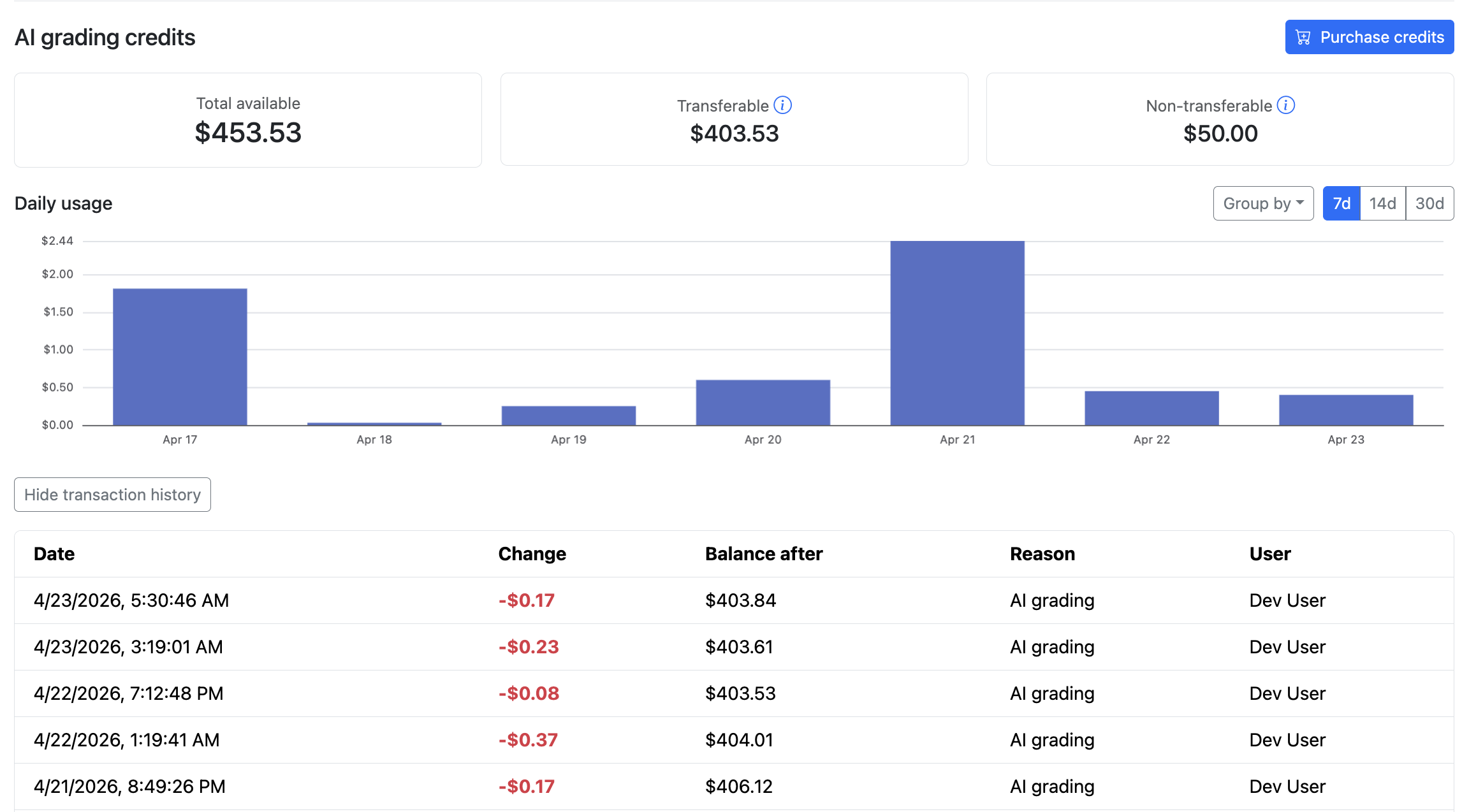
The billing page displays usage in two ways:
- Daily spending chart — Credit usage broken down by day, so you can spot grading spikes or unexpected spend.
- Transaction history — A running log of past credit purchases and deductions.
-
Go to Instance settings → AI grading in your course instance.
-
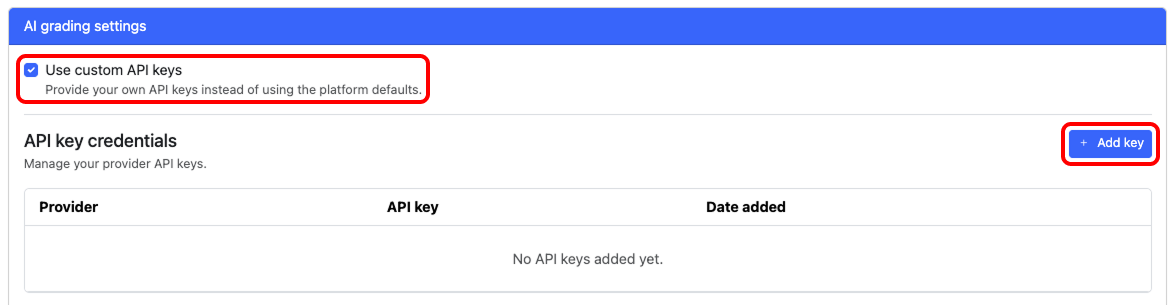
Check Use custom API keys.
-
Click Add key and provide one.
When using custom API keys, instructors are responsible for the provider terms and account configuration.
Accuracy
AI grading has been piloted at the University of Illinois Urbana-Champaign since Fall 2025, across multiple STEM courses and thousands of student submissions.
Across a range of open-ended questions and frontier models, rubric-item accuracy exceeded 99% when paired with clear student work and a well-aligned rubric. Instructors and TAs reported that AI grading was as accurate as human graders for their needs and saved enormous amounts of grading effort.
For more detail, see our published research:
- Text grading — Zhao, C., Fowler, M., Gertner, Y., Poulsen, S., West, M., & Silva, M. (2026). AI-Supported Grading and Rubric Refinement for Free Response Questions. In Proceedings of the 57th ACM Technical Symposium on Computer Science Education (SIGCSE TS 2026).
- Image grading — Levine, J., Aenlle, M., Zilles, C., West, M., & Silva, M. (forthcoming). Automated grading of handwritten mathematics using vision-capable LLMs. In Proceedings of the 27th International Conference on Artificial Intelligence in Education (AIED 2026). Springer.
Cost and runtime
Factors affecting cost and runtime
| Factor | Increases cost | Decreases cost |
|---|---|---|
| Model | Larger, reasoning models | Smaller, non-reasoning models |
| Submission type | Image submissions | Text submissions |
| Question content size | Longer prompts and reference answers | Shorter prompts and reference answers |
| Cached input | — | Repeated content across submissions (e.g., question text, rubric) |
PrairieLearn-managed keys carry a 20% infrastructure fee on top of provider costs.
Benchmarks
Costs vary course-to-course depending on rubric length, submission length, and model choice. The numbers below are representative, not guarantees.
Benchmarks below were run using PrairieLearn-managed keys and include the 20% infrastructure fee.
Numerical methods problem — text grading (139 submissions):
This was a Numerical Methods question with typed, paragraph-length submissions, no randomization, and a rubric.
| Model | Cost / submission | Time / submission |
|---|---|---|
| GPT-5.4 mini | $0.0020 | 0.1s |
| GPT-5.4 | $0.0058 | 0.2s |
| Gemini 3.1 Pro | $0.0126 | 0.6s |
Dynamics problem — image grading (242 submissions):
This was an Intro Dynamics problem that had image submissions, randomization, and a rubric.
| Model | Cost / submission | Time / submission |
|---|---|---|
| GPT-5.4 mini | $0.0042 | 0.3s |
| GPT-5.4 | $0.0159 | 0.5s |
| Gemini 3.1 Pro | $0.0488 | 1.5s |
Per-submission times are measured with many submissions in flight — a single submission graded on its own will take longer.